Glance1.3.4
Publisher Description
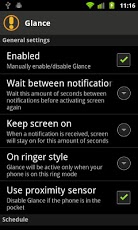
Glance was developed with a few Samsung phones in mind. Most of them (including the Nexus S) do not have a notification LED. However, it also works with devices that HAVE a notification LED and some users *might* find it useful.Glance simply turns on the display (if it's off) for a few seconds (configurable) anytime the phone gets a notification. This allows us to quickly "Glance" at the screen and see if it's important. It's battery friendly and has many built-in options.Features include:- Memory and Battery friendly.- Ability to use proximity sensor. Won't activate the screen if phone is in the pocket.- Allow users to set a schedule in which Glance will be active.- Ability to exclude applications. Some applications are excluded by default (Applications that are known to cause issues).- Support for Android 2.2 through 4.2.- Uses Google's cloud storage for your preferences.- Logcat is optional and turned off by default in order to try to protect your privacy.
About Glance
The company that develops Glance is Daniel Velazco. The latest version released by its developer is 1.3.4. This app was rated by 1 users of our site and has an average rating of 3.0.
To install Glance on your Android device, just click the green Continue To App button above to start the installation process. The app is listed on our website since 2012-12-13 and was downloaded 437 times. We have already checked if the download link is safe, however for your own protection we recommend that you scan the downloaded app with your antivirus. Your antivirus may detect the Glance as malware as malware if the download link to com.danvelazco.glance is broken.
How to install Glance on your Android device:
- Click on the Continue To App button on our website. This will redirect you to Google Play.
- Once the Glance is shown in the Google Play listing of your Android device, you can start its download and installation. Tap on the Install button located below the search bar and to the right of the app icon.
- A pop-up window with the permissions required by Glance will be shown. Click on Accept to continue the process.
- Glance will be downloaded onto your device, displaying a progress. Once the download completes, the installation will start and you'll get a notification after the installation is finished.
Program Details
System requirements
Download information
Pricing
Version History
version 1.3.4
posted on 2012-12-13
version 1.3.4
posted on 2012-12-13
Several fixes and updates
